

Reserving judgement about this episode until I’ve seen the last two hours….
Spoilers follow as usual 🙂
Reserving judgement about this episode until I’ve seen the last two hours….
Spoilers follow as usual 🙂

Could this be the last Mister Chief EVAR!? 😦 Frank will be missed.
Click the image to read the update & his farewell (which vaguely mentions another project of theirs) as well as some funny photoshops.
/
Overall, this was a pretty good episode with lots of mind fuckery.

Spoilers follow if you haven’t seen it….
I AM CONSTRUCTING THIS POST JUST BECAUSE I CAN!
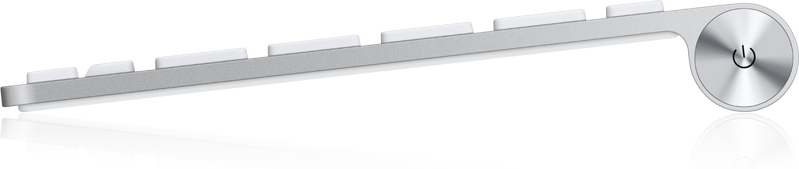 APPLE HAS FIXED THE PROBLEM WITH THE CAPS LOCK KEY WHICH USED TO RESULT IN THE KEYBOARD RANDOMLY LOCKING UP AND CONTINOUSLY SENDING BUTTONS.
IT WAS FIXED WITH THE ‘ALUMINIUM KEYBOARD FIRMWARE UPDATE 1.0’ WHICH CAN BE FOUND HERE
THERE IS NO WINDOWS VERSION UNFORTUNATELY (FOR THOSE WHO ARE JUST USING THE KEYBOARD WITH A WINDOWS MACHINE) SO IT SEEMS THAT YOU WILL HAVE TO LIVE WITH THIS PROBLEM OR BORROW A MAC TO UPDATE YOUR KEYBOARD.

/
Well, as usual, it’s nice for Lost to be back and overall, this was quite a good episode.

As usual, spoilers follow in this badly ordered post if you are yet to see this episode…
Annoyingly, having just gone through an annoying install of Vista x64 (click), Apple has just released an updated version of the Boot Camp drivers / software which:
“addresses issues and improves compatibility with Microsoft Windows XP and Microsoft Windows Vista running on a Mac computer using Boot Camp. It is highly recommended for all Boot Camp users. ”
Click the appropriate link for the version of Windows you are running to download them:
/
Edit:
Have just installed this – – you shouldn’t expect anything useful like the ability to tap-click on the touchpad [can’t someone mod an .inf file or something!?] or Wake on bloody LAN 😦
In fact, I haven’t noticed anything different at all.
According to a comment at TUAW though, it does fix the wireless [Apple] keyboard problem with the caps lock[e] 😛 which would be good, if this installation hadn’t broken my bluetooth…. *sigh*
Edit 2: I’ve just found out that this is the same version that was taken from the Mac Pro DVD, they just decided to release it for everyone now…. (?) So, the fact that it did nothing for me is not surprising… and it is unlikely that it fixed the wireless keyboard thing (though I am yet to try).
Just recently I went about ‘upgrading’ from Vista Ultimate 32 bit to Vista Ultimate 64 bit.

Since Vista Service Pack 1 (SP1) is now out , I figured I would save some time and use a slipstreamed DVD of Vista with SP1 already on it.
This was my first problem: Microsoft introduced EFI support in SP1 and this resulted in problems with my MBP not wanting to boot from the install DVD; All I got when trying to boot from the disc was a message telling me to select either option 1 or option 2 (with no explanation of what difference it would make) and, the keyboard wasn’t working in this mode so it didn’t matter, I wasn’t able to choose either and I couldn’t continue.
Having spent a while googling this problem, I came upon a solution: Follow the instructions here. here. Yes, it’s a fairly long process and requires you to download stuff (and be running Windows in the first place) But, it does work as long as you follow the instructions correctly.
The alternative to doing this is to install Vista without SP1 and (optionally) install SP1 later, but, I believe it will take up more hard drive space this way and having a working SP1 disc will save time in the future (I hope!).
So, having done that, it’s time to install Vista. Nothing else needs to be said about this – it’s an easy process.
So, once you’ve installed Vista, you’ll probably arrive at the desktop like I did and realize that very little has drivers (especially the all important network devices – Ethernet and wifi which could help with getting drivers!).
Inserting the Leopard DVD provided little help – the Boot Camp software did install, but not properly and there aren’t any 64 bit drivers on that disc.
The Snow Leopard disk on the other hand is pretty helpful unless your mac is as old as mine (you’ll get a message saying your computer is not supported). To get around that, follow the instructions at the bottom of this post. If you’ve got a Snow Leopard disk, use that and disregard the stuff until the ‘Snow Leopard Edit’ at the bottom.
You can now use a Snow Leopard disk and skip over the section below. You should update to Boot Camp 3.1 from here though.
I made finding network drivers first priority – since I can just plug in an Ethernet cable, I focused first on that – the required drivers can be found here. I downloaded them on another computer and transferred using a USB stick – I didn’t check to see whether the DVD drive was working at the time so don’t know if burning a CD is an option.
You can also download just the drivers (Bluetooth, iSight, Keyboard, touchpad & remote) from here though these are a bit outdated now.
If you want newer video drivers (the Apple one’s are old), I highly recommend getting them from www.nvidia.com
I now have a completely working MacBook Pro running Vista x64 🙂
/

Click for Macbook Windows 7 x64 guide
Snow Leopard edit: Now that Snow Leopard is out, all the disks have x64 drivers on them. So, if you can, use that. However, if you have an oldish Mac like mine, you may see the following message (Boot Camp x64 is unsupported on this computer model)
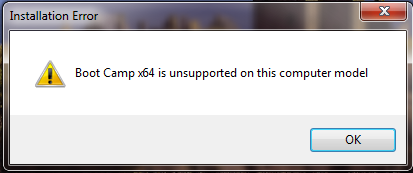
If you do see that, it’s no big deal. Just open up command prompt as an administrator (in the start menu type cmd, right click on it and select Run as Administrator, click yes on the UAC prompt).
In the command prompt window, change to the DVD’s directory by running
cd /d D:
(assuming your Snow Leopard disk is in the D drive).
Now type
cd Boot Camp\Drivers\Apple
And then finally, type
BootCamp64.msi
This circumvents the installers check of your computer model and installs all the relevent drivers properly.
Well, that waaaaaaaaaaallt waaaaas pretty good.
Spoilers follow if you haven’t seen it yet…
hmmm, Well, it was well done but overall, it didn’t seem as though all that much happened (not that that is necessarily a bad thing) Spoilers follow if you haven’t seen the episode… Continue reading
Having seen some trailers for this episode on Sky One, I thought that this may be the episode that would break the pattern I felt Lost had fallen into. If it were to have followed the pattern, this should have been a fillerey episode; which, although good (as most Lost’s are) had no real point. Well, episode 6 did break the pattern – it was quite a good episode actually – but not as good as The Constant.



 Josh Anderson's Blog

